Apache Kafka
Learn about Apache Kafka, the distributed event streaming platform for real-time data pipelines and analytics
Apache Kafka
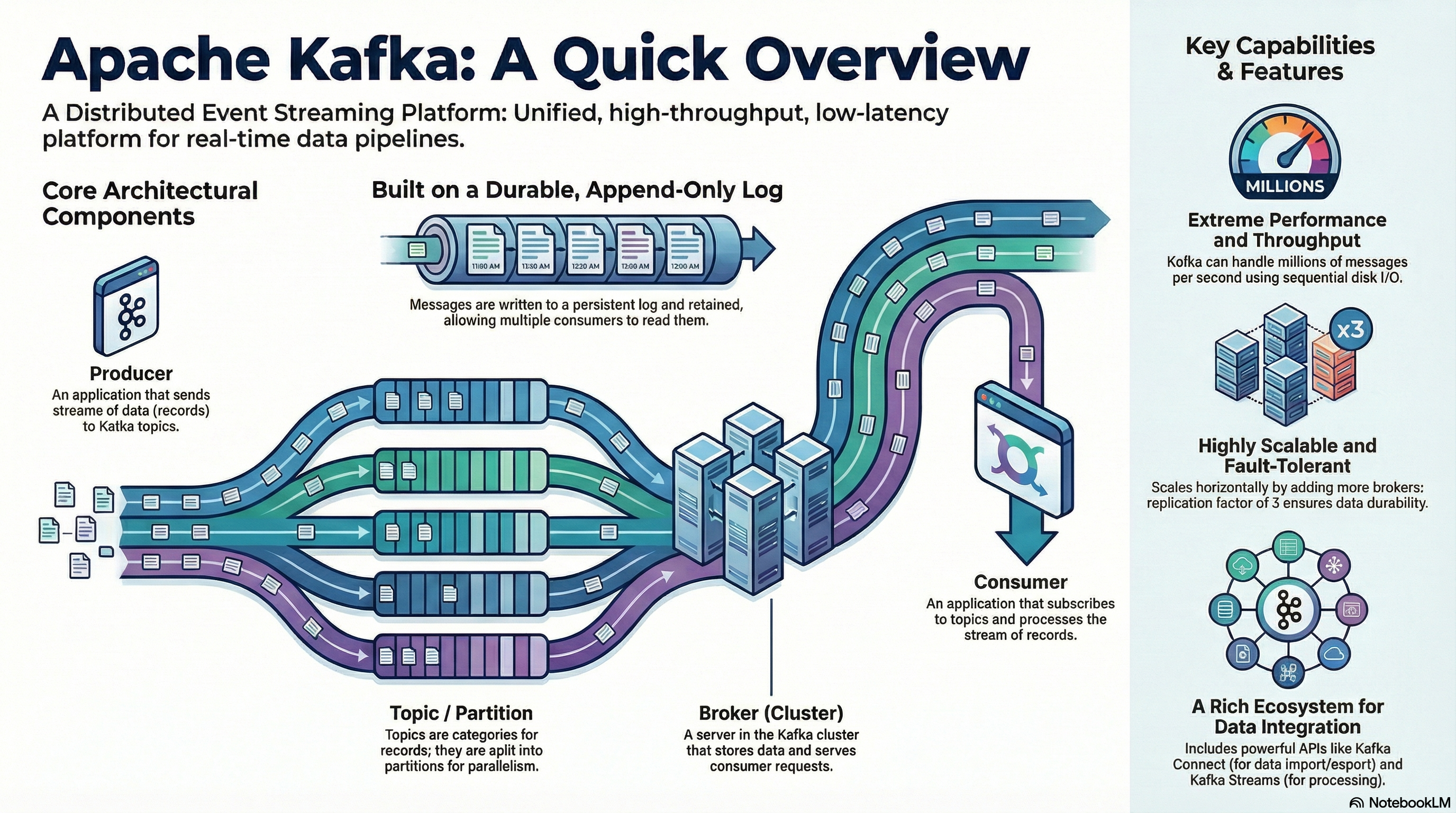
Apache Kafka is a distributed event store and stream-processing platform developed by the Apache Software Foundation. Its core project goal is to provide a unified, high-throughput, low-latency platform for handling real-time data. Unlike traditional messaging systems, Kafka is designed from the ground up to be a durable, scalable, and fault-tolerant "central nervous system" for an organization's data.
Introduction
In today's digital landscape, the ability to process and react to data in real time is no longer a luxury but a core business necessity. From financial services detecting fraud to retailers personalizing customer experiences, modern applications are increasingly built around continuous streams of data. Apache Kafka has emerged as a foundational platform for handling these high-volume, real-time data feeds, establishing itself as the de facto standard for event streaming.
The platform was originally developed at LinkedIn by Jay Kreps, Neha Narkhede, and Jun Rao to manage the company's massive data ingestion challenges. It was open-sourced in early 2011 and graduated from the Apache Incubator in late 2012. Interestingly, Jay Kreps chose to name the software after the author Franz Kafka, explaining that since Kafka is "a system optimized for writing," it made sense to name it after a writer whose work he admired.
Core Architecture
To truly leverage Kafka's scalability and resilience, it is essential to understand its core architectural components. Its design is fundamentally different from traditional messaging systems, focusing on a distributed, durable log that allows for a more flexible and powerful data consumption model.
Key Components
| Component | Description |
|---|---|
| Producers & Consumers | Producers are client applications that publish (write) events to Kafka topics. Consumers are applications that subscribe to (read and process) these events from topics. |
| Brokers | The servers that form a Kafka cluster. Each broker stores and serves data for a subset of partitions, handling massive volumes of read and write requests. |
| Topics & Partitions | A Topic is a named category or feed to which records are published. Topics are split into Partitions, which are the fundamental unit of parallelism in Kafka, allowing data to be distributed and consumed in parallel across the cluster. |
| Metadata Services | A service that tracks the state of the Kafka cluster, including information about brokers, topics, and partitions. Historically managed by ZooKeeper, newer versions use KRaft (an internal consensus protocol designed to replace the external ZooKeeper dependency). |
The Library Model vs. Post Office Model
At the heart of Kafka's design is its message consumption model. A helpful analogy is to think of Kafka as a "library" where it acts as a durable, append-only log. Producers publish messages to topics, which are stored durably for a configured retention period. Consumers are responsible for pulling messages from the log and independently tracking their progress using an offset—a pointer to the last record they have processed.
This model is incredibly flexible, allowing multiple independent consumers to read the same data stream at their own pace and even "replay" events from the past.
This stands in stark contrast to traditional systems, which often follow a model analogous to a "post office." In that model, a broker pushes messages to specific consumers. Once a message is delivered and acknowledged, it is deleted from the queue. While effective for certain use cases, this approach lacks the replayability and multi-consumer flexibility inherent in Kafka's design.
Key Capabilities and APIs
Apache Kafka is more than just a message broker; it is a complete streaming platform with a rich ecosystem of tools and libraries that extend its functionality. This ecosystem allows developers to not only move data between systems but also to process and analyze it in real time as it flows through the platform.
Connect API
The Kafka Connect API provides a scalable and fault-tolerant framework to reliably import data from external systems into Kafka topics and export data from Kafka topics into other systems. It uses pre-built or custom "connectors" that handle the logic of interacting with a specific data source (like a database or a cloud service) or a data sink. This allows developers to build robust and scalable data pipelines without writing extensive custom integration code, focusing instead on the flow of data.
Streams API
The Kafka Streams API is a powerful Java library for building scalable, fault-tolerant, and stateful stream-processing applications directly on top of Kafka. It enables developers to perform real-time transformations, aggregations, and enrichments on event streams. Its architectural significance lies in several key features:
- High-level DSL: Provides a Domain-Specific Language (DSL) with familiar operators like
filter,map, andjoin, simplifying the development of complex processing logic. - Stateful Processing: Leverages RocksDB, an embedded database, to manage local operator state. This allows applications to perform stateful processing on data sets that are larger than the available main memory.
- Fault Tolerance: Achieves fault tolerance using a powerful, self-referential design pattern: Kafka uses its own durable log mechanism to back up its processing state. By treating state changes as another stream of events written to an internal topic, an application can fully rebuild its state store from this changelog in the event of a failure, guaranteeing consistency without complex external checkpointing.
Quick Start Workflow
Getting started with Kafka involves a straightforward workflow, whether you are running a local cluster for development or connecting to a fully managed cloud service.
1. Set Up a Kafka Cluster
This is the first step and involves provisioning the brokers that will act as the central hub for all data streams. This can be done on-premises or, more commonly, through a managed cloud service.
2. Create a Topic
Once the cluster is running, you must create a topic. This acts as a named channel or category for a specific stream of events. For example, you might create a topic named user_clicks or order_updates.
# Create a topic using Kafka CLI
kafka-topics.sh --create \
  --bootstrap-server localhost:9092 \
  --replication-factor 1 \
  --partitions 3 \
  --topic user_clicks
3. Configure Client Access
Applications (producers and consumers) need credentials to interact with the cluster securely. This typically involves creating an API key and secret that the client application will use to authenticate.
4. Produce a Message
With access configured, a producer application can connect to the cluster and begin sending messages (events) to the topic. For example, a web application might produce a message to the user_clicks topic every time a user interacts with the UI.
from kafka import KafkaProducer

producer = KafkaProducer(bootstrap_servers='localhost:9092')
producer.send('user_clicks', value=b'User clicked button')
producer.flush()
5. Consume a Message
Finally, a consumer application subscribes to the topic to read and process the messages. It connects to the cluster, pulls messages from the topic's partitions, and executes its business logic, such as updating a database or triggering an alert.
from kafka import KafkaConsumer

consumer = KafkaConsumer('user_clicks', bootstrap_servers='localhost:9092')
for message in consumer:
    print(f"Received: {message.value}")
Developers can perform these actions using client libraries available in a wide variety of programming languages, including Java, Python, Go, and .NET, among many others. This broad language support makes it easy to integrate Kafka into nearly any technology stack.
Kafka vs. RabbitMQ
While both Apache Kafka and RabbitMQ are powerful systems used for messaging and data exchange, they are designed for different purposes and built on fundamentally different architectural principles. Understanding these distinctions is crucial for selecting the right tool for a specific use case. Kafka excels as a high-throughput streaming platform for real-time data pipelines and analytics, whereas RabbitMQ is a versatile message broker optimized for complex routing and task queues.
| Feature | Apache Kafka | RabbitMQ |
|---|---|---|
| Architectural Model | Pull/Library Model: Consumers pull data from a persistent log and manage their own read offset. | Push/Post Office Model: The broker pushes messages to consumers. |
| Message Retention | Messages are stored in a log for a configurable retention period, allowing for event replays. | Messages are deleted from the queue after they are consumed and acknowledged. |
| Message Ordering | Guarantees strict ordering of messages within a partition. | Maintains a strict First-In, First-Out (FIFO) order within a queue, unless priority queues are used. |
| Priority Queues | Not supported natively. All messages are treated with equal priority. | Supported. Messages can be assigned a priority, and higher-priority messages are processed first. |
| Typical Throughput | Designed for extremely high throughput, capable of handling millions of messages per second. | Optimized for lower latency and complex routing, typically handling thousands of messages per second. |
| Primary Use Case | Real-time analytics, event stream replays, log aggregation, and building data pipelines for large-scale data. | Complex routing for microservices, background job processing, and scenarios requiring specific delivery guarantees. |
Ultimately, the choice depends entirely on the specific requirements of your application. While both systems can be scaled to handle demanding workloads, Kafka's architecture was fundamentally designed for internet-scale data streams.
Principles of Scaling Apache Kafka
While Apache Kafka was built for scale from the ground up, achieving that scale effectively requires a deliberate and strategic approach that goes beyond simply adding more servers. The same partitions that grant Kafka its parallelism can, if mismanaged, become a primary source of scaling bottlenecks.
Core Scaling Strategies
The two primary methods for scaling a Kafka cluster are:
| Strategy | Tradeoffs |
|---|---|
| Vertical Scaling (Scaling Up) | Pros: Simple to implement. Cons: Limited by physical hardware capacity, can create single points of failure, diminishing returns on cost. |
| Horizontal Scaling (Scaling Out) | Pros: Enables massive parallelism and throughput, improves fault tolerance. Cons: Increases operational complexity, metadata overhead, and network traffic during rebalancing. |
For most large-scale deployments, horizontal scaling is the standard approach, as it provides the elasticity and fault tolerance needed to handle significant data volumes.
Common Scaling Challenges
As Kafka clusters grow, operators often encounter a set of common challenges that can impact performance and stability if not addressed proactively:
- Uneven Load (Hot Partitions): This occurs when certain partitions receive significantly more traffic than others (often a result of a poorly chosen partition key), causing the brokers hosting them to become performance bottlenecks.
- Consumer Lag: If consumer applications cannot process messages as fast as they are being produced, a backlog (lag) builds up, leading to processing delays.
- Painful Broker Rebalancing: Adding or removing brokers triggers a partition reassignment process that can cause temporary drops in throughput and spikes in resource usage.
- Disk and Network Bottlenecks: Kafka's performance is heavily dependent on fast disk I/O and network bandwidth, which can become saturated under heavy load.
Scaling Best Practices and Anti-Patterns
To navigate these challenges, it is helpful to follow established best practices while avoiding common mistakes:
| Do's | Don'ts |
|---|---|
| Right-size partitions to balance parallelism with metadata overhead. | Over-provision partitions, which can overwhelm the cluster controller. |
| Enable batching and compression to reduce network and storage load. | Ignore metadata scaling, as ZooKeeper/KRaft health is critical. |
| Monitor proactively to identify issues before they become critical. | Scale manually in the cloud without leveraging automation. |
| Offload cold data using tiered storage to keep brokers lean and fast. |
By applying these strategic principles and avoiding common anti-patterns, organizations can ensure their Kafka deployment grows sustainably, solidifying its role as a core component of their modern data infrastructure.
Installation & Setup
Using Docker
The easiest way to get started with Kafka is using Docker Compose:
version: '3.8'
services:
  zookeeper:
    image: confluentinc/cp-zookeeper:latest
    environment:
      ZOOKEEPER_CLIENT_PORT: 2181
      ZOOKEEPER_TICK_TIME: 2000

  kafka:
    image: confluentinc/cp-kafka:latest
    depends_on:
      - zookeeper
    ports:
      - "9092:9092"
    environment:
      KAFKA_BROKER_ID: 1
      KAFKA_ZOOKEEPER_CONNECT: zookeeper:2181
      KAFKA_ADVERTISED_LISTENERS: PLAINTEXT://localhost:9092
      KAFKA_OFFSETS_TOPIC_REPLICATION_FACTOR: 1
Local Installation
For production or more control, you can install Kafka directly:
# Download Kafka
wget https://downloads.apache.org/kafka/2.13-3.6.0/kafka_2.13-3.6.0.tgz
tar -xzf kafka_2.13-3.6.0.tgz
cd kafka_2.13-3.6.0

# Start Zookeeper
bin/zookeeper-server-start.sh config/zookeeper.properties

# Start Kafka (in another terminal)
bin/kafka-server-start.sh config/server.properties
Best Practices
- Partition Strategy: Choose partition keys carefully to ensure even distribution of messages across partitions.
- Replication Factor: Set replication factor to at least 3 for production environments to ensure fault tolerance.
- Retention Policy: Configure appropriate retention periods based on your use case (time-based or size-based).
- Consumer Groups: Use consumer groups effectively to enable parallel processing and load balancing.
- Monitoring: Implement comprehensive monitoring for brokers, topics, partitions, and consumer lag.
- Compression: Enable compression (gzip, snappy, lz4) to reduce network and storage overhead.
- Batching: Configure appropriate batch sizes for producers to improve throughput.
- Idempotent Producers: Enable idempotent producers to prevent duplicate messages.
- Schema Registry: Use Schema Registry for managing Avro, JSON, or Protobuf schemas.
- Security: Implement SASL/SSL for authentication and encryption in production environments.
Conclusion
Apache Kafka has fundamentally changed how modern organizations handle data, evolving from a simple message queue into the central nervous system for real-time data. It provides a durable, scalable, and unified platform for building event-driven applications, streaming data pipelines, and real-time analytics systems. By understanding its core architecture, APIs, and scaling principles, developers and architects can unlock its full potential to build systems that are responsive, resilient, and data-rich.
Next Steps
- Explore the official Apache Kafka documentation
- Look into introductory courses like "Kafka 101" to build a solid foundational knowledge of core concepts and operations
- Investigate managed Kafka services to understand how they abstract away the operational complexity of scaling, rebalancing, and monitoring
- Experiment with Kafka Streams API for real-time data processing
- Learn about Kafka Connect for building data pipelines